The two new functions that have been detected in the beta version of the browser integrated in the Google application: Read aloud and Translate. Reading aloud is something Chrome users are familiar with as it allows the Google Assistant to read an article aloud to users who may not be able to read it in the usual way. When you use this feature, words that are read aloud are highlighted on the screen. There are also some playback controls like speed settings.
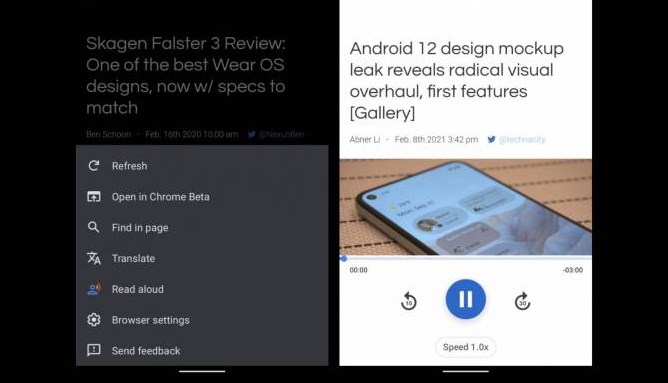
The Read Out Loud feature doesn’t seem to have a dark mode and only uses Google’s signature four-color scheme. Other modes seem to have the monochrome option, but this is the “colorful option” for users. However, it would have been nice if there was a prominent play button similar to Google Go’s Read Out Loud feature. In any case, the Read Aloud on Google Search and Google Discover browsers can be found in the additional menu.
The app’s browsers will also apparently get the Translate option, which is similar to the Chrome experience as well. You will see a bar at the bottom of the screen that will allow you to translate the current language of the page you are viewing into the language of your choice. It will automatically suggest the language, but you will also be given the option to choose the one you want to use.


